The Cameo System (シェアードシングルプレイ Shared Single Play?)[1] is the name of the first online cooperative mode in the Devil May Cry series featured in Devil May Cry 5.
In the game, Nero, Dante and V are the main playable characters, and depending on the mission being played, they will intersect with each other which will trigger the Cameo System.
In some situations, players will be split up from each other, but it is possible to fight alongside another player in the same battle zone. If the two players are far apart, the game will replace enemy encounters for the player who is further behind, but if they are close enough an encounter cleared by one player will remain clear for the second. Once the Mission is over, an "Evaluation" menu will be available, where players can rate their guests as "Stylish!", earning these ranks will award the player with one Gold Orb for each rating.[1] Awards are not granted immediately, rather being granted during a server synch that only occurs once per day at the same time that the 1-orb daily login bonus resets. They will then be awarded the next time the player starts up the game during the initial loading operation. The Mission Select menu also displays the amount of ratings one has obtained in total for each mission with the system available.
A fair number of missions have the Cameo System available, and even if the user is offline, developer data will be used in the instances where another player is supposed to appear, which is known by seeing the name "THE DMC CREW" in the "Starring" list.[2] If the player has played the level as the other character themselves, their own run of the level may be used: in this case, they will see their own username. In addition, players in a users' friend list will be prioritized when possible if the "Friend Priority" option is turned on the Network menu, however, they cannot be invited manually.[3]
The player name box will also display if that player gets an S, SS or SSS ranking in combat, showing it to the right of their name for as long as they maintain it. Lower ranks are not shown.
By default all player names are shown in white text. However, if a player has completed the Bloody Palace with their active character then their name will appear in gold instead.
One way to know when a real player is present during the intersection is by trying to skip cutscenes, a "Waiting for Partner(s)" notice will appear at the top right, indicating that the guest hasn't skipped the cutscene and is present in the session. This will, however, only occur if the two players are close enough together that they both end up watching the same cutscene at the same time, otherwise it can be skipped as normal.
The player has several options they can set themselves under the "Network" tab of the options menu. They can turn off cameos by human players by disabling the "Network" option, turn on a "spoiler filter," and set "friend priority."
Friend priority will mean the game prioritizes pairing the player with runs of the game by users on their system's friend list. The spoiler filter, if switched on, will hide any alternate character costumes the player has not unlocked themselves. It does not hide weapons the player has not yet received, however.
Real-time matchmaking rules
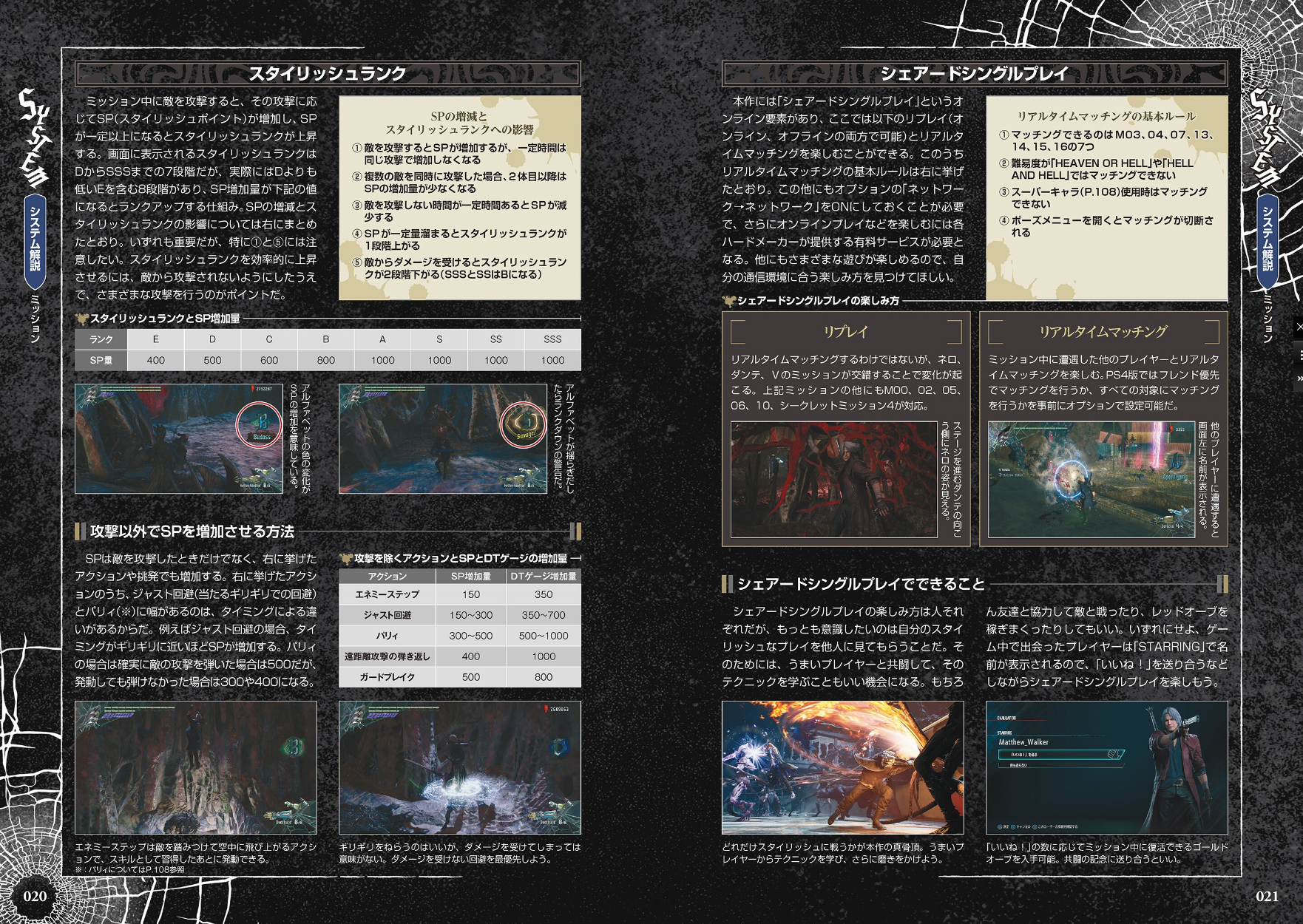

Page about the Cameo System in the Devil May Cry 5 Official Complete Guide.
The following are the rules to the real-time matchmaking according to the Devil May Cry 5 Official Complete Guide:
- It's possible to match with players in real-time on M03, M04, M07, M13, M14, M15 and M16.
- Matchmaking will not match two players who are on different difficulties; i.e. someone playing on DH would not be matched with someone playing on DMD even if they meet all other matchmaking requirements.
- Real-time matchmaking is turned off on "Heaven or Hell" and "Hell and Hell" difficulties.
- Real-time matchmaking is turned off when using a Super Costume.
- Opening the pause menu or picking up a blue or purple orb fragment or gold orb will end the cameo. The game will attempt to synch a new cameo once gameplay resumes.
Additionally, in the Special Edition:
- Real-time matchmaking is turned off when playing on Legendary Dark Knight difficulty.
- Real-time matchmaking is turned off when playing in Turbo mode.
The Cameo System is not supported when playing as Vergil.[4]
Link Missions
The following are the missions where players are able to trigger the Cameo System, it's possible to match with someone's recorded data on all of these missions unless specified otherwise.
- Main Missions
| Mission | Intersects with | Cameo information | Real-time or recorded data? |
|---|---|---|---|
| Prologue | Mission 10 | Seen in background | Recorded data only |
| Mission 02 | Secret Mission 04 | Seen in background | Recorded data only |
| Mission 03 | Mission 04 | Seen in background, V's destruction of two Blood Clots affects Nero's side of the map. | Real-time is possible |
| Mission 04 | Mission 03 | Seen in background | Real-time is possible |
| Mission 05 | Mission 06 | Background sounds of the battle between Nero and Gilgamesh | Recorded data only |
| Mission 06 | Mission 05 | V's actions affect whether Gilgamesh's legs come up damaged | Recorded data only |
| Mission 07 | Mission 07 (V or Nero) | Overlapping path, both players can fight the last three encounters and the Angelos together | Real-time is possible |
| Mission 10 | Prologue | Records a cameo for Nero in the Prologue, but there appears to be no actual Nero cameo here | Recorded data only |
| Mission 13 | Mission 13 (V, Nero, Dante) | Overlapping path, players can clear the main rooms of the mission together | Real-time is possible, recorded data seems to be impossible |
| Mission 14 | Mission 15 and 16 | Seen in background | Real-time is possible |
| Mission 15 | Mission 14 and Mission 16 | Seen in background | Real-time is possible |
| Mission 16 | Mission 14 and Mission 15 | Seen in background | Real-time is possible |
- Secret Missions
| Mission | Intersects with | Cameo information | Real-time or recorded data? |
|---|---|---|---|
| Secret Mission 04 | Mission 02 | Seen in background | Recorded data only |
Further notes
- When Devil May Cry 5 was added to the online stores of PlayStation, Xbox and Steam, the game was tagged as having online play on all platforms with the PlayStation and Xbox stores stating that "2-3" were the maximum amount of players in a lobby, this was long before the Cameo System was announced during The Game Awards 2018.[5]
- On console, a PlayStation Plus or Xbox Live Gold subscription are required in order to experience this system with other players online.[1]
- If no one is found during the search time, the game will automatically match the player with a recording of someone's play data.[6]
- Devil May Cry 3: Dante's Awakening has a "hidden" offline co-op mode that allows the user to play with a friend via the use of the Doppelganger Style or by using Vergil during Mission 19: Forces collide. With the release of the Devil May Cry HD Collection on the PlayStation 4, players can use the SharePlay feature to play this mode with a friend across the globe.
- The Nintendo Switch version of Devil May Cry 3 has an offline co-op mode for the Bloody Palace.
- Resident Evil 6, another Capcom game, features a system very similar to this one called Story Intersections. Every campaign has at least one chapter with a player intersection where a 4-player co-op is possible, though playing with someone's recorded data is not possible in that game, perhaps due to technical limitations or time constraints during its development.
- One of the reasons why Devil May Cry 5 has no Holy Waters or Vital Stars is because of the Cameo System, in a DengekiOnline interview, Itsuno stated that they wanted players to spend as little time as possible standing still in the pause screen because of this new system.[7]
- The game code for Devil May Cry 5 includes data that mentions the use of an invite system and texts which allude to a searching mechanic.
- In addition, in the text file related to the "Evaluation" screen there is a text that reads "Times fought together", which is something that remained unused in the final game.
Gallery
Images


.png "DMC5 Player icon (V).png (64 KB)")
Videos
Sources
- ↑ 1.0 1.1 1.2 CAPCOM: Devil May Cry 5 Official Site
- ↑ The Game Awards extended Devil May Cry 5 trailer featuring V, cameo system and more - Capcom Unity
- ↑ Devil May Cry 5 - "We Still Have a Couple of Surprises" - Interview
- ↑ 「デビル メイ クライ 5 SE」バージルや次世代機ならではの新モード制作秘話にも迫った開発者インタビュー!|ゲーム情報サイト Gamer
- ↑ Steam, Xbox, PlayStation
- ↑ Weekly Famitsu - December 20, 2018
- ↑ 電撃 - 『DMC5』新キャラ“V”のアクションポイントに迫る。世界に通じるように開発者が心掛けたことは!?


_page2.jpg)